
Coming soon to the United States
Your customer calls.
You know who it is.
WatzContacts automatically syncs your QuickBooks Online customers to your iPhone or Android contacts, so your phone can identify customers when they call.
WatzContacts for QuickBooks Online is in development and not yet available in the United States.
Incoming call
Riverside Plumbing Co.
Existing customer · QuickBooks Online
Illustrative example with fictional contact data.
The problem
Your customers are already in QuickBooks. Why doesn't your phone know them?
You keep customer names and phone numbers up to date in QuickBooks Online. But that information usually stays inside QuickBooks. When a customer calls your cell phone, you often just see a number, not a name. You either answer blind or stop to look the number up before you can call back.
How WatzContacts helps
QuickBooks customers, on the phone where your calls actually happen.
WatzContacts doesn't create another address book. It puts your QuickBooks customer contacts where your phone already expects contacts to be: your native iPhone or Android contacts.
QuickBooks Online
Your customer records
WatzContacts
Automatic sync
iPhone & Android contacts
Native contacts and Caller ID on your phone
QuickBooks Online integration is coming soon. This diagram shows the planned data flow.
The benefit
Recognize. Call back. Without opening QuickBooks.
Recognize incoming calls
Calls from existing QuickBooks customers show a name through your phone's native Caller ID, instead of just an unfamiliar number.
Call back easily
Call a customer straight from your normal phone call history or contacts. No need to open QuickBooks and search for their number.
Recognizable in your call history
A missed call shows the customer's name, not just an unknown number, even when you check the call history later.
iPhone and Android, equally
WatzContacts is designed for both native iPhone contacts and native Android contacts, so your whole team can use it regardless of device.
Kept in sync automatically
When a customer's phone number changes in QuickBooks, the synced contact updates. When a synced contact should no longer be synced, WatzContacts removes it again.
No second address book
QuickBooks Online stays the one place where you manage customer records. WatzContacts doesn't add another contact app to maintain.
A common small-business problem
Is that unknown number actually a customer?
An unfamiliar number calls, and you have to decide in a couple of rings whether to pick up. If that caller is already a customer in your QuickBooks Online account, WatzContacts can make them identifiable through your phone's native contacts and Caller ID, once their contact information has been synced.
Stop mistaking customers for unknown callers.
WatzContacts does not detect spam or robocalls, and it cannot identify every unknown caller. It helps identify callers whose contact information exists in your connected QuickBooks customer data and has been synced to your phone.
Why not just use QuickBooks?
QuickBooks has your customers. WatzContacts keeps them available where calls happen.
QuickBooks Online already lets you add an individual customer to your phone's contacts by hand. WatzContacts is built for a different job: keeping your relevant QuickBooks customer contacts synced to your phone automatically, at scale, instead of adding them one by one.
Manual vs. automatic
- Adding customers to your phone one at a time works for a handful of contacts, not a growing customer list.
- WatzContacts is designed to sync your relevant QuickBooks Online customer contacts automatically, so new and updated customers keep showing up without manual work.
- QuickBooks Online integration is coming soon; exact setup steps will be confirmed at launch.
Beyond the phone app
Native contacts, available to the apps that use them.
Because WatzContacts syncs into your phone's native contacts, rather than a separate app-only list, other apps that read your device contacts can potentially use the same customer information.
Phone and calling apps
Communication apps that read your device's native contacts, such as your phone's own call and voicemail apps, may show the synced customer name.
Voice assistants & hands-free
Because these are native contacts, compatible voice assistants and hands-free car systems can, depending on device and settings, also use them.
Available offline
Once synced, the customer's name and number live locally on your device, so already-synced contacts stay available even without a connection.
Actual availability depends on the specific device, operating system settings, and the permissions granted to each app. WatzContacts does not have a partnership or direct integration with third-party communication apps.
Data scope
Only what's needed for Caller ID. On purpose.
WatzContacts is built for customer contact synchronization, not accounting access. It is designed to process only the customer contact data required to identify a caller, not accounting data such as invoices, balances, or bookkeeping records.
Your data stays yours. WatzContacts is designed to sync only your own QuickBooks Online customer contacts to your own devices. Exact QuickBooks Online permissions will be confirmed as the integration is finalized; see our security page for details.
How it will work
The planned QuickBooks Online integration.
QuickBooks Online integration is coming soon. Here is the conceptual flow we're building toward. Exact screens and steps will be confirmed at launch.
-
1
Connect QuickBooks Online
Authorize WatzContacts to access the customer contact information required for synchronization.
-
2
WatzContacts syncs your customer contacts
Relevant customer names and phone numbers are securely synchronized to your account.
-
3
Use WatzContacts on iPhone or Android
The mobile app manages the synced contacts in your phone's native contacts.
-
4
Know when customers call
Your phone uses its native contacts to show the customer's name when a synced customer calls.
A preview
Synced contacts, right where your phone expects them.
The screens below are from the current WatzContacts app and show what a synced contact and an identified incoming call look like on a native phone contacts app.
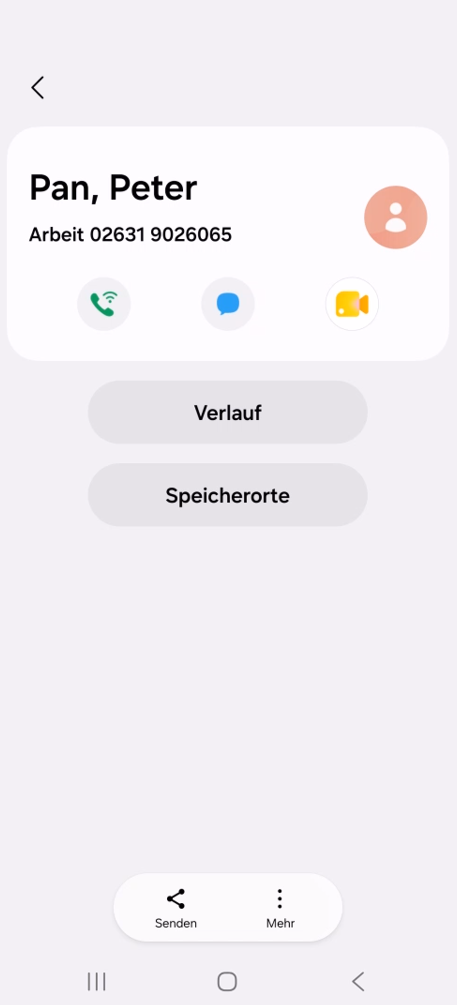
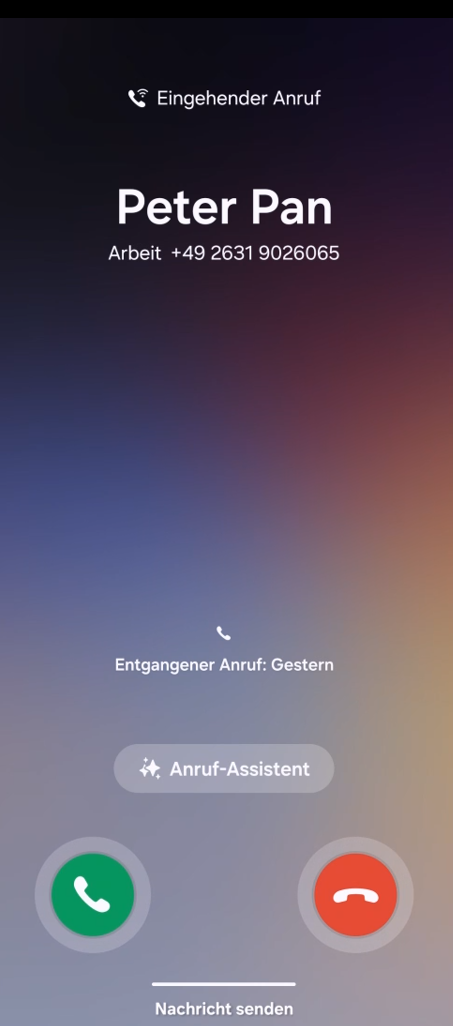
Preview screenshots from the current WatzContacts app. US screenshots with QuickBooks Online branding will replace these before launch.
Who it's for
Built for QuickBooks Online users who talk to customers on the phone.
WatzContacts is intended for small businesses where owners or staff regularly call and get called by customers already stored in QuickBooks Online. These are example use cases, not existing customers.
- Contractors
- Home service businesses
- HVAC businesses
- Electricians
- Plumbers
- Landscaping businesses
- Repair & service companies
- Consultants
- Agencies
- Small field-service teams
Coming soon
WatzContacts for QuickBooks Online is coming soon.
Be among the first to know when WatzContacts launches in the United States. We'll email you once, when the QuickBooks Online integration is live.
Notify me at launch
Frequently asked questions
QuickBooks contacts on your phone, answered.
How do I sync QuickBooks contacts to my iPhone or Android?
WatzContacts is designed to connect to your QuickBooks Online account and automatically sync your customer contacts into your phone's native iPhone or Android contacts. This integration is coming soon.
Does WatzContacts create a separate address book?
No. WatzContacts syncs into your phone's existing native contacts, not a separate app-only address book.
Is WatzContacts available in the United States yet?
Not yet. WatzContacts for QuickBooks Online is in development. Sign up above to be notified at launch.
Know when a QuickBooks customer is calling.
WatzContacts for QuickBooks Online is coming soon to the United States. Be the first to know when it launches.